Scenes
Prepare a layout for each part of the call, then switch with one click. A transition animates the change on the output while your webcam and overlays hold still.
Sel for Mac
Pick the windows that matter, arrange them on one clean canvas, and share that canvas in any meeting app. Your desktop stays yours.
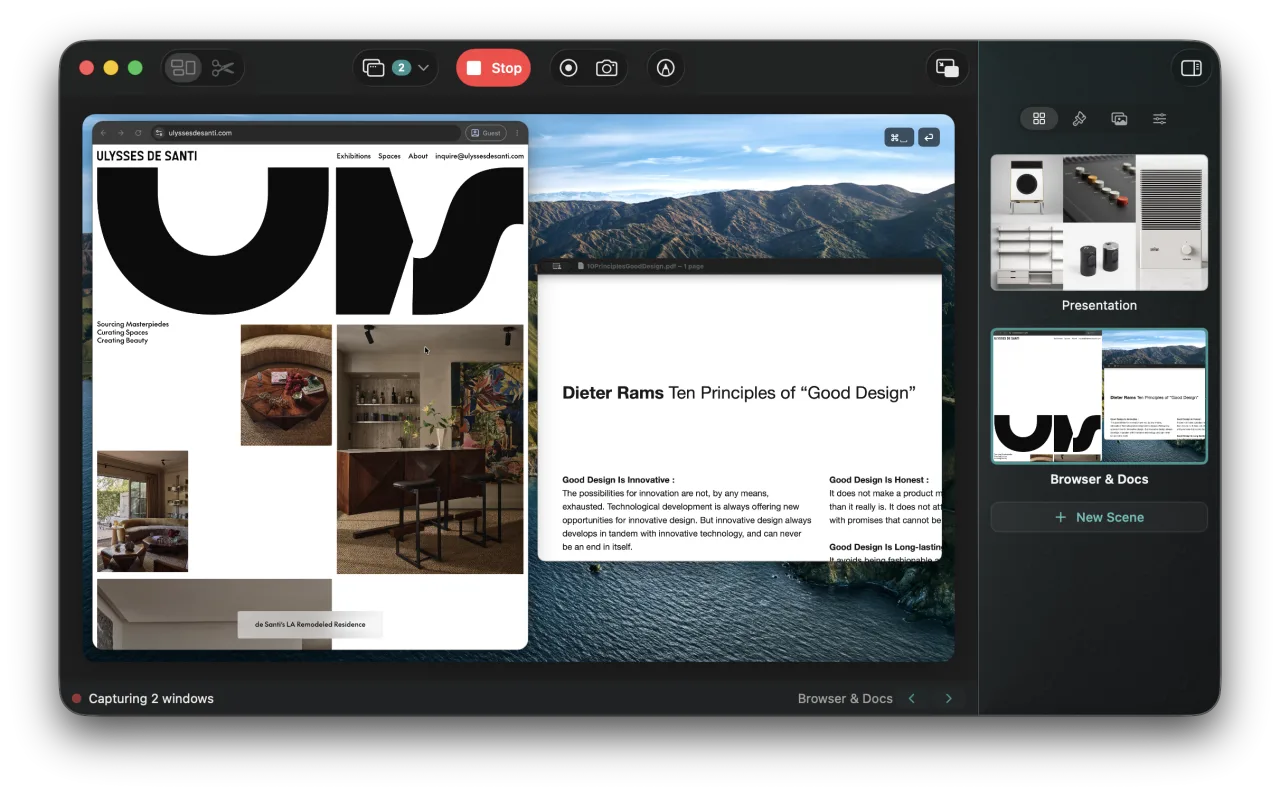
Demo an app, walk through code, teach from a browser. Sel keeps the output clean while you work.
Prepare a layout for each part of the call, then switch with one click. A transition animates the change on the output while your webcam and overlays hold still.
Mark up your apps live with pen, highlighter, arrows, shapes, and text. Attach a drawing to a window and it follows the window. Each scene keeps its own drawings.
Zoom into the detail you are explaining. The zoom follows your pointer and glides at full frame rate, while your webcam, captions, and overlays stay in place.
Give a scene images, animated GIFs, and text blocks. Drag them into place with snapping guides, then lock, hide, or reorder them from the sidebar.
Resize a shared window or crop its edges in the layout editor. Cropped windows keep their rounded corners.
Shows the keys you press on the shared canvas. Password fields are excluded.
A webcam overlay you can move and resize, with optional background blur.
Speech is transcribed on-device and shown as captions on the share.
Record the composed output to a file, or capture a still image. A corner thumbnail can be dragged into other apps.
Show the composed canvas fullscreen on a second display, for classrooms and in-person demos.
Optionally include the macOS menu bar above the canvas. Menus you open are visible too.
Duplicate a scene with its windows, background, transition, and overlays. Reorder scenes by dragging.
Sel collects no data. Screen content and recordings stay on your Mac, and purchases go through Apple. Read the privacy policy.

Free to try on the Mac App Store. Requires macOS 15 or later.